Switchboard Start Guide
Destinations
Live Streaming Software and Encoders
Live Stream Management
Switchboard Features
Troubleshooting
Troubleshoot Facebook Business Page
Troubleshooting: Perform a Speed Test
Troubleshooting: My embedded YouTube Live video will not play on my website
Disable pop-up blockers
How to verify that I am an Admin of a Facebook Group
Not Receiving Video
Need to Reach Us?
FAQ
Subscriptions and Billing
Account Management
💬
Feedback
🗺️
Roadmap
📝
Changelog
    Home
  1. Troubleshooting
  2. How to verify that I am an Admin of a Facebook Group

How to verify that I am an Admin of a Facebook Group

Last updated Over 2 years ago

Follow the steps below to learn how to verify if you are the admin of the Facebook group.

Step 1

Navigate to the Facebook Group

Step 2

Click "Members" from under the group’s name.
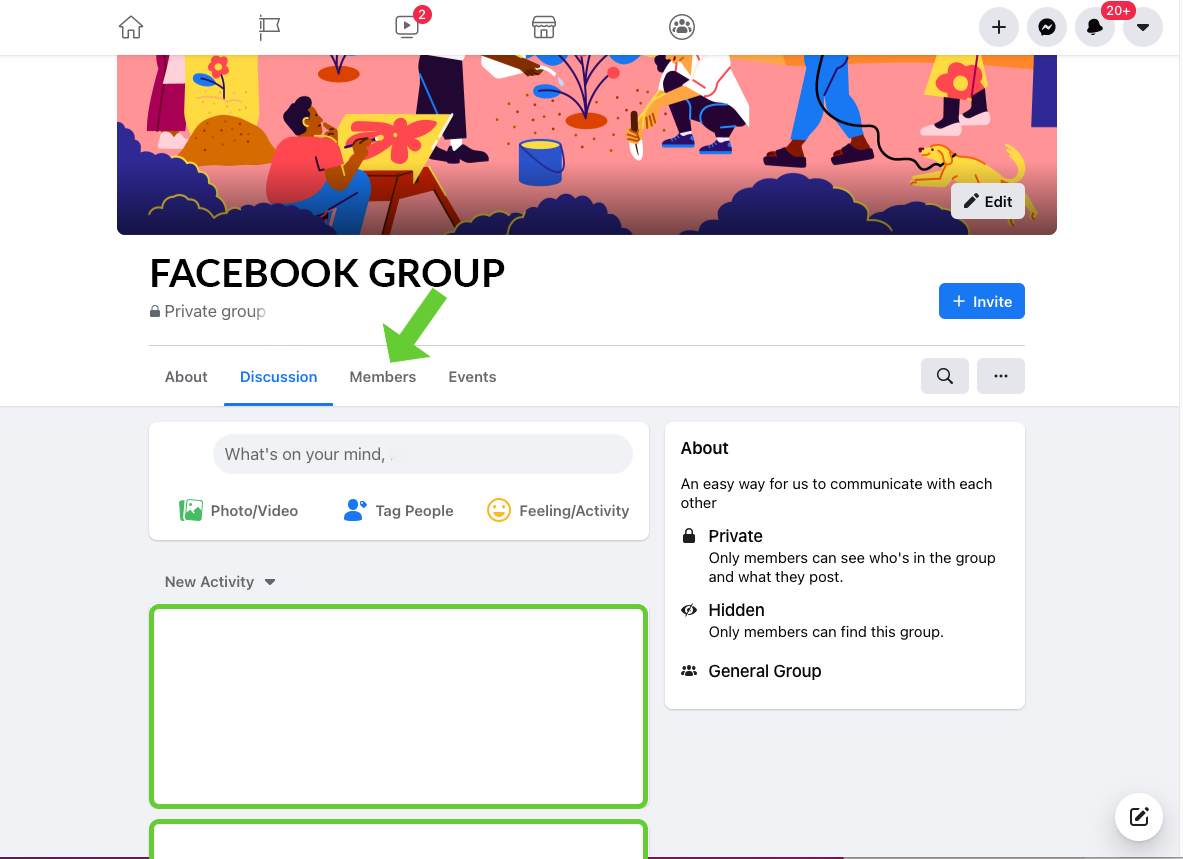
verify-facebook.png

Step 3

The "Admin badge" will show next to your profile image.

admin.png

Useful resources to check out:

  • Stream to Facebook Groups with Switchboard Cloud
  • How Do I Add a Facebook Profile, Page or Group as a Custom RTMP in my Switchboard Cloud account?
  • Connecting Facebook to Switchboard Cloud
  • Invite others with StreamShare

On this page

    Follow the steps below to learn how to verify if you are the admin of the Facebook group.Step 1Step 2Step 3

Was this helpful?